Category Archives: Technology

Linux ls output colors

If you’ve used linux much and your terminal is set to display files and directories in color, you know how frustrating it can be to have dark blue text on a black background like so (I’ve seen it much worse too)…
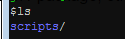
dirColorBefore

If you would like to modify the output so the colors are a bit more readable, you can add the following to your .bashrc file…

alias ls='ls --color'
LS_COLORS='di=33:fi=36:ex=31'
export LS_COLORS

which will produce an easier to read version like so (with directories yellow, files a crayon/teal, and executable files red)…
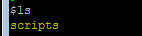
dirColorAfter

As pointed out in this article

The first line makes ls use the –color parameter by default, which tells ls to display files in different colours based on the setting of the LS_COLORS variable.

The second line is the tricky one, and what I have worked out so far has been by trial and error. The parameters (di, fi, etc.) refer to different Linux file types. I have worked them out as shown

di = directory
fi = file
ln = symbolic link
pi = fifo file
so = socket file
bd = block (buffered) special file
cd = character (unbuffered) special file
or = symbolic link pointing to a non-existent file (orphan)
mi = non-existent file pointed to by a symbolic link (visible when you type ls -l)
ex = file which is executable (ie. has ‘x’ set in permissions).

The *.rpm=90 parameter at the end tells ls to display any files ending in .rpm in the specified colour, in this case colour 90 (dark grey). This can be applied to any types of files (eg. you could use ‘*.png=35’ to make jpeg files appear purple.) As many or as few parameters as you like can go into the LS_COLORS variable, as long as the parameters are separated by colons.

Using trial and error (and a little bash script I wrote… my first one ever! 🙂 I worked out all the colour codes, at least my interpretation of them –

0 = default colour
1 = bold
4 = underlined
5 = flashing text
7 = reverse field
31 = red
32 = green
33 = orange
34 = blue
35 = purple
36 = cyan
37 = grey
40 = black background
41 = red background
42 = green background
43 = orange background
44 = blue background
45 = purple background
46 = cyan background
47 = grey background
90 = dark grey
91 = light red
92 = light green
93 = yellow
94 = light blue
95 = light purple
96 = turquoise
100 = dark grey background
101 = light red background
102 = light green background
103 = yellow background
104 = light blue background
105 = light purple background
106 = turquoise background

Please remember to subscribe to the newsletter or feed to stay up to date!

Disclaimer: Thoughts and opinions are my own, and do not reflect the views of any employer, family member, friend, or anyone else. Some links may be affiliate links, but I don't link to anything I don't use myself.

NullPointerException – could not publish to server

Ok, so this is an obscure one, but if it saves anyone from multiple days of banging their head against the wall it’s worth it…

Recently I was working in eclipse, had created my component, compiled it, and had it pushed to our ivy repository. I then went to bring it into another (web) project when I started getting complaints about a NullPointerException. For kicks I tried running the web app and received the error “NullPointerException (could not publish to server)”. With all that useful information how could I not figure out what the problem was?

Fortunately another developer I spoke with had seen the issue before and pointed me in the right direction. In the utility component/jar you have to (see screen shot below too)…

  1. Go to Project -> Properties
  2. Click on “Project Facets”
  3. Check “Utility Module”

And then it will just magically work. Wasn’t that completely obvious?

EclipseUtilityMode

Please remember to subscribe to the newsletter or feed to stay up to date!

Disclaimer: Thoughts and opinions are my own, and do not reflect the views of any employer, family member, friend, or anyone else. Some links may be affiliate links, but I don't link to anything I don't use myself.

How Much Space Is Being Used by 1 LOB / CLOB / BLOB in DB2

Building off of yesterdays lesson on how to determine how much space a table is using (including LOBs and Indexes), there may come a time when you need to determine how much space 1 or more specific records are taking up. To do that, use the LENGTH() function which will return you how many bytes the field is using. Simply do some math to get a more useful value (like KB).

SELECT length(LOB_DATA_X) BYTE_A, length(LOB_DATA_X) / 1024 KB_A
FROM XX.MY_TABLE
FETCH FIRST 10 ROWS ONLY WITH UR FOR READ ONLY;
Please remember to subscribe to the newsletter or feed to stay up to date!

Disclaimer: Thoughts and opinions are my own, and do not reflect the views of any employer, family member, friend, or anyone else. Some links may be affiliate links, but I don't link to anything I don't use myself.

Get Space Used by LOB / CLOB / BLOB in DB2

If you have a DB2 table and want to get information as to how much space a particular table is using, you could try and deduce it from things like the row length, or you could just query the view via a table function and make your life a heck of a lot easier.

For instance, start with something like this…

SELECT * FROM TABLE(SYSPROC.ADMIN_GET_TAB_INFO('XX', 'MY_TABLE'));

Previous versions of this function include ADMIN_GET_TAB_INFO_V97 and ADMIN_GET_TAB_INFO_V95. The nice thing is that it appears you don’t have to be a DBA to query the info which is nice for us app developers out there!

Keep in mind that sizes returned are in KB, so you may want to convert the data to something more useful like so…

SELECT  TRIM(TABSCHEMA) || '.' || TRIM(TABNAME) AS TABLE_NM,
        DATA_OBJECT_P_SIZE / 1024 AS DATA_P_SIZE_NB, 
        LOB_OBJECT_P_SIZE / 1024 AS LOB_P_SIZE_MB, 
        XML_OBJECT_P_SIZE / 1024 AS XML_P_SIZE_MB, 
        LONG_OBJECT_P_SIZE / 1024 AS LONG_P_SIZE_MB, 
        (DATA_OBJECT_P_SIZE + LOB_OBJECT_P_SIZE + XML_OBJECT_P_SIZE + LONG_OBJECT_P_SIZE) / 1024 AS TOTAL_P_SIZE_MB,
        INDEX_OBJECT_P_SIZE / 1024 AS INDEX_OBJECT_P_SIZE_MB
FROM TABLE(SYSPROC.ADMIN_GET_TAB_INFO('XX', 'MY_TABLE'));

See also: this link

Please remember to subscribe to the newsletter or feed to stay up to date!

Disclaimer: Thoughts and opinions are my own, and do not reflect the views of any employer, family member, friend, or anyone else. Some links may be affiliate links, but I don't link to anything I don't use myself.

Determine Default Java JVM HeapSize

In the life of a Java developer every now and then you’ll have one of your apps run out of memory. While this is usually due to poor coding (not closing resources, or managing large files) it helps to know exactly what the defaults are for your system. I had just this need today so went out looking for an answer.

What I found that was the most helpful was this page, but for quick reference here’s how to do it on Windows…

c:\>java -XX:+PrintFlagsFinal -version | findstr /i "HeapSize PermSize ThreadStackSize"
 
    uintx InitialHeapSize                          := 266634176       {product}
    uintx MaxHeapSize                              := 4267704320      {product}
    uintx PermSize                                  = 21757952        {pd product}
    uintx MaxPermSize                               = 85983232        {pd product}
     intx ThreadStackSize                           = 0               {pd product}
java version "1.7.0_40"
Java(TM) SE Runtime Environment (build 1.7.0_40-b43)
Java HotSpot(TM) 64-Bit Server VM (build 24.0-b56, mixed mode)

Note that the values returned are in bytes so throw them into google to convert them into something useful 🙂

Please remember to subscribe to the newsletter or feed to stay up to date!

Disclaimer: Thoughts and opinions are my own, and do not reflect the views of any employer, family member, friend, or anyone else. Some links may be affiliate links, but I don't link to anything I don't use myself.

Pass a Command Line Argument to an Alias

Ever want to pass in a command line argument to an alias? You would think you could just do it with $1, but actually you have to create a function and then call that function. So, for instance if you want to pass a portion of a log file name, you could set your alias like this…

alias catlog='function _catIt() { cat /var/logs/$1.log; };_catIt'

then, when you want to see the XX00D log, you just call your alias like so…

catlog XX00D
Please remember to subscribe to the newsletter or feed to stay up to date!

Disclaimer: Thoughts and opinions are my own, and do not reflect the views of any employer, family member, friend, or anyone else. Some links may be affiliate links, but I don't link to anything I don't use myself.

Google App Launcher Keyboard Shortcut

If you’re using AutoHotKey (and I would recommend that you do), here’s a handy script for remapping the caps lock to show the app launcher (which is convenient if you’ve gotten used to a Chromebook)

SetCapsLockState, AlwaysOff
Capslock::Run, chrome.exe --show-app-list
Please remember to subscribe to the newsletter or feed to stay up to date!

Disclaimer: Thoughts and opinions are my own, and do not reflect the views of any employer, family member, friend, or anyone else. Some links may be affiliate links, but I don't link to anything I don't use myself.

Checking and Maintaining Linux Disk Space

Ever need to find out what’s using the most space on your Linux box? There are a couple commands that will help make things easier…

To find out how much space you have use:

df -h .

Which will give you output like so…

Filesystem      Size  Used Avail Use% Mounted on
/dev/sda         20G   15G  4.2G  79% /

To list out the directories using the most space, use this handy command…

sudo du /usr/local | sort -n

… where /usr/local is the directory you want info for (you can also just start from root: /)

Please remember to subscribe to the newsletter or feed to stay up to date!

Disclaimer: Thoughts and opinions are my own, and do not reflect the views of any employer, family member, friend, or anyone else. Some links may be affiliate links, but I don't link to anything I don't use myself.

Learning VIM

So you would think that as a programmer for many moons now that I would have considerable experience in VIM and VI, but I’m hear today to admit that I am not. For years I’ve gotten by with my favorite Windows text editor notepad++, but the geek in me wanted to know why everyone loves Vim so much. To that end the 2 things I started with are…

I can’t say I’m a convert yet, but it’s always nice to have another tool in the toolbelt. Here for your and my reference is my quick VIM cheat sheet.

Please remember to subscribe to the newsletter or feed to stay up to date!

Disclaimer: Thoughts and opinions are my own, and do not reflect the views of any employer, family member, friend, or anyone else. Some links may be affiliate links, but I don't link to anything I don't use myself.

Connect to DB2 via UNIX Command Line

To access DB2 via the command line on a UNIX/Linux box you need…

  • The DB2 client installed on the box
  • The DB you’re trying to connect to cataloged in the client

Once you know you have that, simply source your db2profile and connect…

. /path/to/db2profile
db2 connect to DBCATNAME user yourid using yourpw

… where DBCATNAME is the name the DB is cataloged as on that box, yourid is your user ID for connecting to the DB, and yourpw is your password for connecting to the DB. Note, that if the actual database resides on the same box, and you want to login as the user your logged into the UNIX box as, you can simplify the connect string and not have to include your user ID or password…

. /path/to/db2profile
db2 connect to DBNAME
Please remember to subscribe to the newsletter or feed to stay up to date!

Disclaimer: Thoughts and opinions are my own, and do not reflect the views of any employer, family member, friend, or anyone else. Some links may be affiliate links, but I don't link to anything I don't use myself.